 | |||
 |
 |
 | |
 |
 | ||
 |
 | ||
 |  | ||
 |  | ||
| |||
|
|
|
| |
|
|
| ||
|
| ||
| | ||
| | ||
Written by Paul D. Race for Family Garden Trains(tm)
 and Big Indoor TrainsTM and Big Indoor TrainsTM |
| Please Read: How to Help Our Site at No Cost to You - Some of our articles contain recommendations for products we like and vendors we personally trust. Some of those vendors may pay us a very small commission if you click on a link and buy their products. This costs you nothing at all and helps offset the costs of what we do. So if we point you to something you decide to buy later, please make certain you come back through our site and click on the link directly. Thanks. |


|
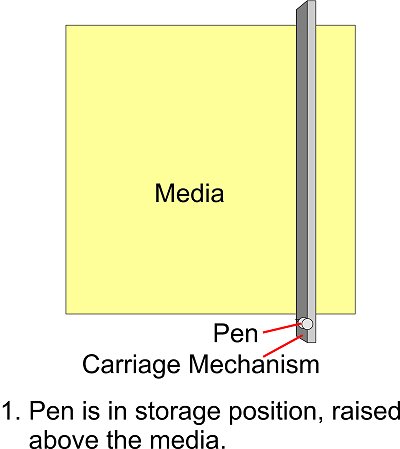
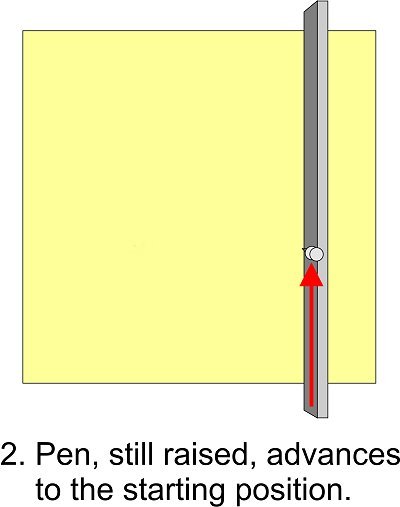
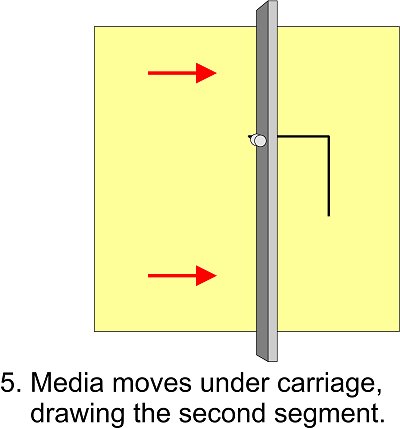
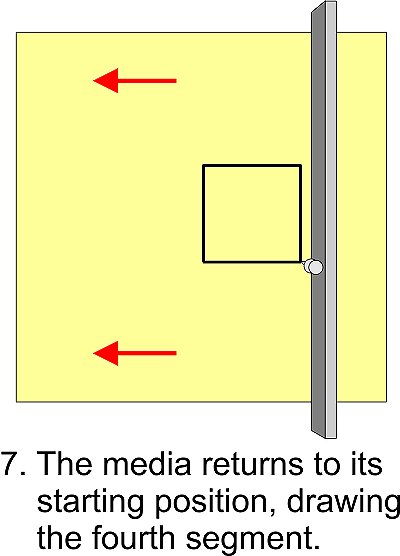
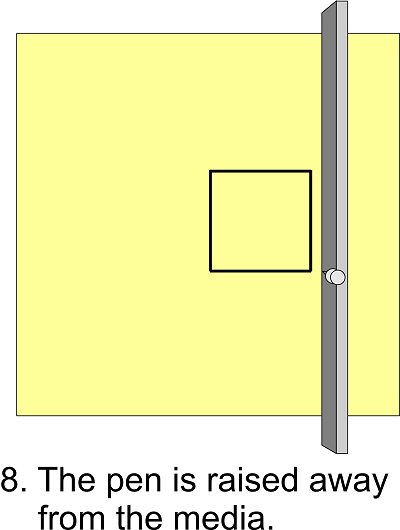
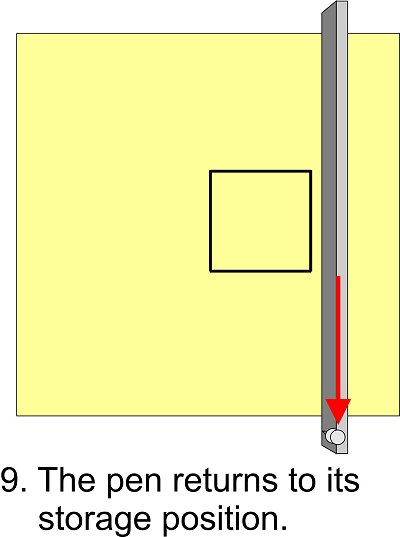
How Plotters and Craftcutters Draw or CutThis material was originally part of our "Introduction to Craftcutters" article because it explained some basic principles that were helpful for new users of craftcutters. Since then, most people who've dabbled with these things or watched a YouTube video have a pretty good idea. However we're keeping the content posted for anyone who wants to dig a little deeper into the origins and mechanics of these things. Thinking in Two DimensionsLong before ink jets or laser printers were developed, someone had the idea of making a device in which a single pen, controlled by a computer, would go back and forth across a piece of paper drawing lines. But if that's all the device did, at the end of your "job" all you'd have is one big line - a one-dimensional image as it were. How do you make the device draw in two dimensions? Since they already had the techology to feed paper through such a machine, they decided to get the second dimension by making the paper go back and forth as well. To draw a square, for example, the machine would go through the following motions:
Graphics designers, mathematicians, and a host of others use the term X axis and Y axis to describe the movement that creates lines in each direction. If you grew up with an Etch-a-Sketch, you got used to controlling the X axis with one knob and the Y axis with the other. But on your Etch-a-Sketch, your "pen" moved in both directions and the media (the screen) stayed in the same place. Unlike the Etch-a-Sketch, a plotter or cutter moves the pen or blade along one axis and the media (paper, vinyl, etc.) along the other axis. (A few plotters and cutters have been made in which the pen/blade moves along both axes, but they are in the minority). Plotters (and Cutters) are Line-Driven Devices.How do you draw a diagonal using X and Y axes? Well, on the Etch-a-Sketch, you tried to move both knobs (X and Y) the same amount at the same time - not an easy task. On a plotter (or on a cutter, which we'll discuss presently), the pen/blade (X) and the media (Y) move at the same time. Fortunately, the plotter or cutter is hooked up to a computer that is a lot more precise than the average Etch-a-Sketch user's fingers. The computer calculates the precise direction - or vector that is necessary to draw the desired shape, then the "driver" software figures out how the combined movements of the pen/blade and the media will create that line on the media.Plotters are Better at Drawing Lines than "Filling In." - Remember how you filled in "dark" areas on your Etch-a-Sketch? You went back and forth about a hundred times with one knob while turning the other knob just a little so your lines would overlap. Now, occasionally, folks who use plotters will need to fill in a space, and the software does the same thing. But you have to agree that's a very inefficient use of a machine that will draw lines like a bat-out-of-you-know-where. When it comes to cutters, there's no point at all to "filling in." Lines - technically vectors - are all you need. Vector Graphic Software Designs the Lines - It's probably no surprise that the earliest and still the most popular use of plotters is to draw blueprints, product plans, topographical maps, weather maps, and other things that are 99% lines. To create such patterns, you need software that excells at creating precise lines. Among its other uses, AutoCad is a "vector graphic" program. So are CorelDraw, Adobe Illustrator, and Inkscape, a free program. Vector graphic programs are in contrast with "paint" programs like PhotoShop, or Paint Shop Pro that manipulate millions of tiny dots arrayed in a matrix called a "bitmap." Can you draw a diagonal line with a paint program? Yes, but when you zoom way in, you'll realize that the edge of that line is anything but straight. Yes there are ways to convert simple bitmap drawings so that they will work with modern craftcutters, but it's more precise to start and stay with vectors if you can.
|
 |
 |
 |
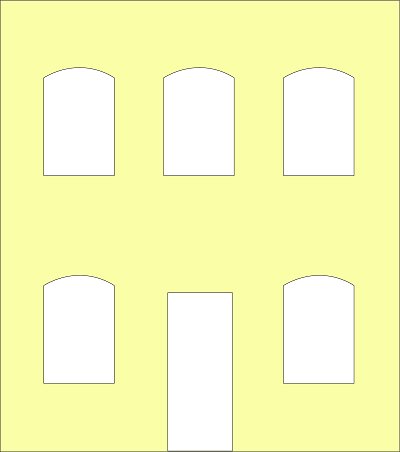
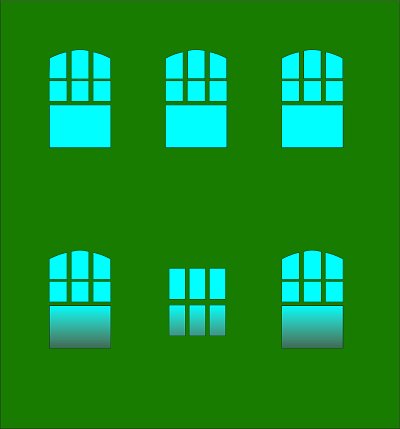
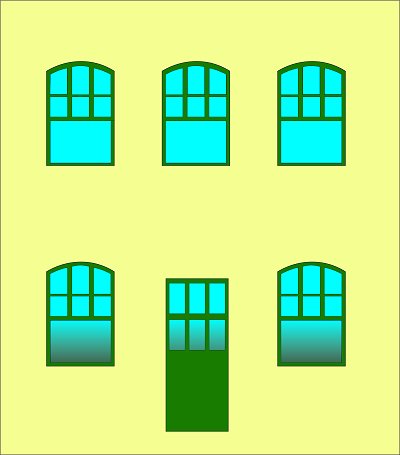
What happens when you stack them up? In the illustration below, the blue represents the clear windows.
 |
 |
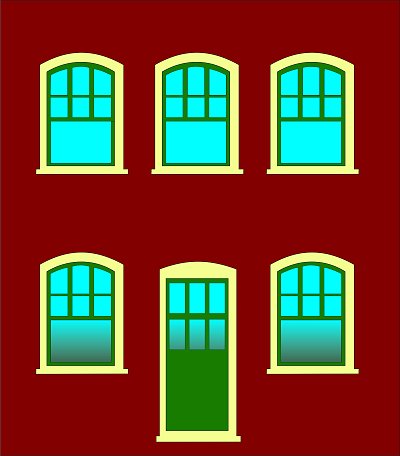 |
You can see that with added signage (which we provide as well - elsewhere), buildings built up from layers of signcutter vinyl could be effective. 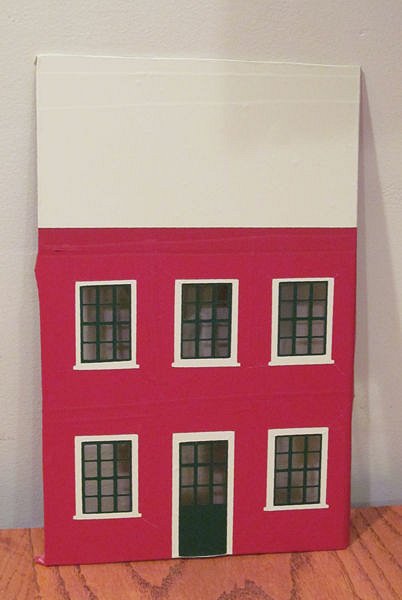 The photo to the right shows one of our earliest experiments, just to show you that it can be done. No, it's not quite easy as I made it sound, but it can be done.
Okay, you say, this is a lot of work to go through for one little building. But in this case, size is limited only by the width of the signcutter. What if you wanted to imitate, say, the factories in the North Pole scenes of Polar Express? A whole town of factories? Once you'd designed the original graphics, you could make your buildings 24" high (or more depending on the cutter) almost as easily as you could make the little building in our example. A small team of workers could create in days a "city" display that would take weeks to create any any other way.
Of course this is just the beginning of the storefront. You'd want to add signage, maybe shutters, lighting, curtains, interiors, whatever you wanted. If you took any care at all with the finished product, not one visitor in a hundred would guess that it started out on a vinyl cutter.
We'll have a separate article on using this process to make buildings - this was just to "whet" your appetite. We'll also have one on using craftcutters to make stencils that you can use to make windowshapes and even signage for wood-only buildings.
Okay, here's the irony, sort of. As far as I can determine now from park records, the arboretum's sign department never did get around to making buildings this way. (They hired Paul Busse's Imagineering business to create the garden railroad and its structures.) But the idea has stuck with me all these years, and hopefully you can see the possibilities.
You Have The Power (or Might Could Get It) - Back to the signcutter buildings - Why didn't I try this out myself when I first heard it? Well, at the time signcutters were prohibitively expensive for hobbyists. And my acquaintances with signcutters thought I was out of my mind when I tried to explain this to them. (So did most of my other friends, come to think of it.)
 Exit the Signcutters - By the way, many sign and print shops have started using large-format color laser printers for the kind of projects that signcutters used to handle. So don't read this article and assume that your friendly neighborhood sign shop will be able to help you if you walk in with a collection of vector graphic files. For that matter, even if they still have their signcutters, you'll still have some 'splainin' to do.
While I was researching this article, I did track down several signcutters that don't cost any more than some of the craftcutters we'll be talking about later. But most of the cheap ones still require proprietary software that is clunky and - in some cases - renders them less suitable for the kind of projects we're discussing than many craftcutters.
Okay, as a part-time graphic designer, I couldn't help wishing (for many reasons, not just this one) that I had access to a signcutter. But over a decade after I retired that idea for financial reasons, I saw electronic craftcutters becoming available for under $300. Except for the size of the media and the relative sturdiness of the machine, you should be able to do almost anything with a craftcutter you could do with a signcutter, given the right software drivers. 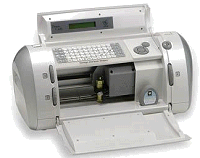
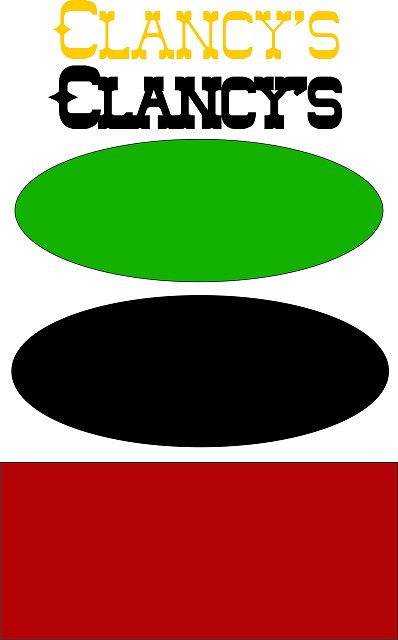
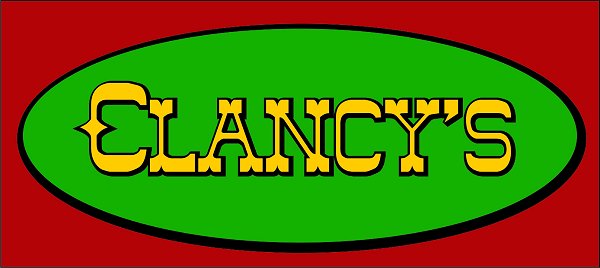
Enter the Cricut (And the Cartridge Paradigm) - As you probably know by now, the first electronic craftcutter to find its way into many homes was the Cricut, followed by the Cricut Expressions, a similar product that could cut bigger media. The Cricut was designed to require "cartridges," something like the old Atari game cartridges (but much smaller) that you would plug into the machine. Each cartridge would typically have a typeface for writing messages and a collection of cutesy outlines that you could combine to make elaborate layered doodads for decorating scrapbooks or greeting cards. You would change the media to change colors, then layer the output, like the Clancy's example above.
Unfortunately, if you used that generation of Cricut the way they were designed, you could only cut outlines and typefaces that were on the cartridges you owned. If you saw another typeface or outline you wanted, and it was on a $30-$50 cartridge, you had to buy that cartridge, too.
To make it freestanding, the Cricut also had a built-in keyboard that you could use to type messages that would be cut out eventually. Some non-scrapbookers have figured out how to use this feature to make nice signs or similar projects. Still, you don't see keyboards on other cutters because they're redundant if you use a computer to drive your cutter.
Enter the Computer Geeks - To expert computer users, having to buy a $30-$50 cartridge every time you wanted to change fonts on the cutter seemed as silly as if you had to buy a new cartridge to go from Helvetica to Times Roman on your inkjet. So it was a matter of time before a number of companies figured out how to use the Cricut's USB connection to make it cut out shapes that weren't on the cartridge. The new programs essentially reduced the Cricut to a sort of  overpriced printer which could cut outlines using graphics and typefaces from nearly any source.
The most popular of the software packages was CraftEdge.com's "Sure Cuts-A-Lot." CraftEdge based the look and feel of their program on the look and feel of the Cricut itself, so it was pretty easy for experienced Cricut owners to figure out.
Frankly, that accommodation makes the interface seem a little awkward (especially since the software doesn't work with the Cricut any more - see below). But for me, those were secondary issues. To me, the most important feature of Sure Cuts-A-Lot, Make-the-Cut, and similar software was that I  could design my own graphics, then export them to a file format (.svg) that Sure Cuts-A-Lot or Make-the-Cut could import and use to drive the cutter.
I was on a budget, though, and I didn't get it right away. I also have serious time constraints, so when I did get around to buying a Cricut Expression and release 2 of Sure Cuts-A-Lot, it took me another year before I actually tried out the whole setup. It worked as advertised, pretty much, but by the time I had done enough experiments to start writing articles about it, everything had changed.
Cricut Closes the Door to Third-Party Outlines and Fonts - You've noticed that I used past tense a lot in the previous section. That's because there was a "reset" in 2011. Back at ProvoCraft's marketing division, they couldn't help noticing that scrapbooking fan sites were filling up with free downloadable .svg outlines. Cricut owners who had installed Sure Cuts-A-Lot or Make-the-Cut were downloading and cutting out thousands of outlines and fonts without buying more cartridges. This was bad news to people whose business plan depended on users paying $30-$50 a typeface.
So lawsuits happened. By the time the software companies had settled with ProvoCraft in court, it was apparent that Cricut would never again allow those particular floodgates to be reopened.
The software companies withdrew their current offerings and created new releases that would not support the Cricut. Every subsequent Cricut model has had firmware safeguards against this kind of "repurposing." I'm told that some "mandatory" upgrades to earlier models also add anti-"repurposing" software. So if you own a Cricut that once might have worked with the verboten software, it might not now. (That's why I cautioned you against firmware upgrades.)
Cricut also came out with software that was supposed to make designing your own graphics easier. In the last two years, their product line has diversified and their software has changed with it. In addition, the Cricut "Gypsy" now allows you to use downloadable typefaces that you buy from ProvoCraft. But you still can't incorporate outlines and typefaces that you didn't buy from them one way or another.
That's why I said earlier that if you have a Cricut and software that works with it to guard it with your life.
This is also why I say "Don't rush out and buy a Cricut if you want to cut your own designs."
Also, don't rush to the Internet and download the "fully working" version of Sure Cuts-A-Lot 1 or 2 that many sites advertise, unless you want a working copy of the old demo that cuts a test pattern across anything you cut, plus an assortment of very determined viruses added by the bootleg sites.
Finally, don't get me wrong - ProvoCraft had every right to keep their products from being used by markets they weren't designed to support. They never promised their users that Cricuts would work with third-party software. And the revenue from cartridge sales has allowed them to continue making new products that delight their target market.
But my core needs - cutting my original designs - remove me from ProvoCraft's target market, so I'll have to look elsewhere for my next cutter.
A modeler, designer, or putz house builder who wants to get the minimum use out of any computer/craftcutter setup will need:
About Vector Graphic Software - If you want to get maximum use, consider acquiring a vector graphic software package that exports files your cutter software program can read. For example, Sure Cuts-A-Lot and several other programs read .svg files, a kind of vector graphic interchange format.
I use CorelDraw X.5 on my PC. It exports .svg files, but CorelDraw hasn't always supported them. So if you come across an older version you can afford, try to make certain that it's legal and that it's not too old. At the "shareware" end of the scale, I'm told that Inkscape and DrawPlus will both create nice vector graphic files that can be saved as "plain" .svg files (a format that most craftcutters and modern signcutters can read).
If you have an Apple, the best vector graphic software you can buy is probably Adobe Illustrator. Like CorelDraw, it's expensive and very powerful. Although I'm told that experienced Apple users can use Inkscape, I don't know how easy it is to install on an Apple. I also don't know if there's a second choice that will work for most people, so if you're an Apple user with answers, let me know what you know, and I'll post the information here.
About Bitmap Graphic Software - If you are a whiz with a paint program, you can get some use out of it with most craftcutter software. Just be sure your output is either lines ONLY or a silhouette. Most craftcutter software will "import" such a graphic, usually asking whether you want to follow the centerline on lines. Answer that question "yes." Otherwise it will try to treat the line as a solid object and cut out the edges of it - a useless complication for most purposes.
Simple graphics like the building outlines shown above will generally convert well, as long as you start out with a fairly large graphic. If you try to convert a small bitmap graphic and then make it larger in your craftcutter software, you may discover weird artifacts as a result of the dots-to-line conversion process.
About Craftcutter Software - As mentioned before, no craftcutter software package now supports Cricuts. But most of them support almost everything else. A CraftEdge rep recently told me that when Cricut "locked down" their system, the software developers were just as happy to support the "open systems" out there. And the other cutter manufacturers went out of their way to make certain CraftEdge developers had everything they needed to support their machines. In fact, the CraftEdge site now includes several "bundles," through which you get a price break if you buy Sure-Cuts-A-Lot or eCal with a compatible craftcutter.
Some of the For example, CraftEdge now makes versions of Sure-Cuts-A-Lot that work great on:
The Sizzix EclipsTM, require special versions of the software called eCAL - so be sure you're buying the version you need. Fortunately, CraftEdge.com allows you to download a demo. The demo will cut a test pattern through whatever you cut with it. But you can use the demo to prove that the software will talk to your cutter before you lay out hard cash, er, plastic.
Make-The-Cut also has a long list of supported cutters. I won't get involved in a Chevy-or-Ford argument between those two sofware packages, only to say that each has its fans.
There are other manufacturers; in addition, many cutters have their own software - if you're already using vector graphic software to create your graphics, that plus the bundled software may do most of what you need for now.
When choosing craftcutter software:
About Cutters - As you can see by the list above and on the web site, since Cricut abandoned the designer and hobbyist market, quite a few other craftcutters have become available. A few of the "new brands" seem to be cheap Chinese imitations, so pay attention to reviews before you lay out real money. In addition, a couple signcutter companies have come out with entry-level models that will appeal to hobbyists, crafters, and designers.
By the way, HPGL is the name of the "language" that computers use to communicate with Hewlett-Packard plotters. So that's not a bad thing if you see it in the product listing - it means that they're making an effort to be as "open" as possible.
If you're looking for specific recommendations, you won't get them from me, at least until I've had my hands on most of them. Sorry.
Whatever you buy, make certain that it is compatible with whatever software you plan to use and vice versa.
Also if you plan on working it hard (say, cutting a lot of posterboard or the like), look for a cutter designed to take that sort of abuse on a regular basis.
In addition, if you've been thinking about getting a cutter for your own or your club's purposes, I hope this helps you avoid any critical mistakes.
Watch this page: more articles are in the works.
As always, we want to hear your suggestions, criticisms, additions, etc. Enjoy your hobbies, and especially any time you can spend with your family in the coming months!
Paul

| 
|
|
 |
|
 |
 |
Note: Family Garden TrainsTM, Garden Train StoreTM, Big Christmas TrainsTM, BIG Indoor TrainsTM, and BIG Train StoreTM are trademarks of Breakthrough Communications (www.btcomm.com). All information, data, text, and illustrations on this web site are Copyright (c) 1999, 2000, 2001, 2002, 2003, 2004, 2005, 2006, 2007, 2008, 2009, 2010, 2011, 2012, 2013 by Paul D. Race. Reuse or republication without prior written permission is specifically
forbidden.
Family Garden Trains is a participant in the Amazon Services LLC Associates Program, an affiliate advertising program designed to provide a means for sites to earn advertising fees by advertising and linking to amazon.com.
For more information, please contact us

 |  |




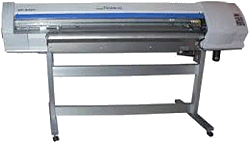 Back in the early 2000's, I was contacted by an arboretum that was setting up a Christmas-themed garden (outdoor) railroad for the first time. At the time they were planning to have their "sign shop" make the buildings.